
As AI application builders like Bolt.new turn a weekend of prompting into a working application, more businesses are running software their own staff can’t explain. While the screens look finished, the code underneath was generated to satisfy a prompt, and nobody has asked it to survive a year of real users. Vibe coding is the practice of describing an application in plain language and letting an AI tool write the code, allowing a founder to ship something usable without a development team.
You’ve probably lived the next part. You described the application, the tool built it, and it worked. A week later, the first support ticket lands, and nobody on your side can say why the list stopped loading. Your vibe coded application feels finished, and the land mines are under the surface, each one waiting for a real user to step on it.
The tools produce a convincing application. They don’t yet produce a supportable one. Let’s look at how these tools changed our own process, the eight land mines our team finds most often, and how to defuse them while keeping the screens you already have.
How Vibe Coding Changed Our Own Process
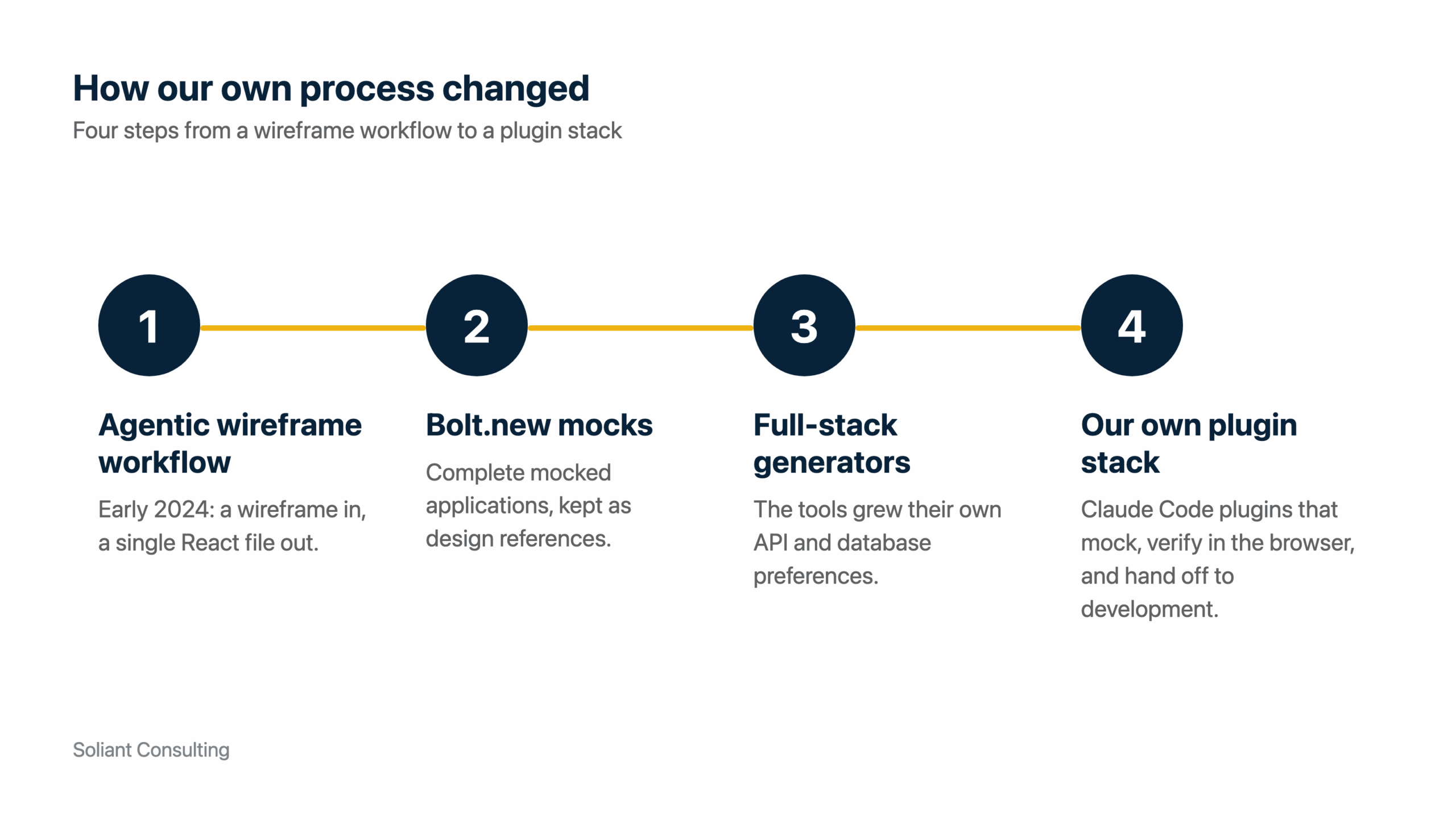
At Soliant, we started down this road before the term existed. In early 2024, we stitched together an agentic workflow that took a wireframed web application and output its core structures (header, hero, content, and footer) into a single app.js React file. It was a “Frankenstein” of a workflow, but it worked. Not much later, tools like Bolt.new came out, and we used them to build complete mocked web applications.
Two of the design references we still keep in our workspace are Bolt.new exports, each with React, a component library, form handling, and a validator already wired in. Those tools then grew into full-stack generators, each with its own API and database preferences. We moved off hosted generators and now curate our own stack of Claude Code plugins, built on the Claude models. That stack includes a React mock designer that verifies every screen visually in the browser and a story-mapping tool that turns the finished mock into development stories. We still build the design mock first and develop against it, and quality assurance tests the finished application against that same mock.
The payoff is on the calendar. A design cycle that once ran on weeks of back and forth over static wireframes can now run on a working screen your stakeholders click through, exposing missing features before development starts.
Eight Land Mines Under the Surface
Every land mine below comes from vibe coded applications our team has been asked to look at after they shipped. None of them shows up in a demo. Each one waits for real data, real users, or a real attacker, and each one has a known fix. Below is the list.
1. The Data Is Handled in the Browser
A generated application typically loads the entire table into the browser and pages, sorts, and filters it there. At 1,000 rows, this works fine. At 10,000 rows the first page load stalls, and at 100,000 the browser tab may give up before anything renders. The tool wrote what the prompt asked for and put the paginator on the wrong side of the network.
Server-side data handling moves that work to the API. Our APIs page data with a cursor and return links to the next page, and where a list runs long, our React applications virtualize it, rendering only the rows on screen and fetching more as the user scrolls. To check your own application, open the network tab in your browser and load the list. If the whole table arrives in one request, the pagination is cosmetic.
Stalled page loads are the first thing your users stop trusting. The fix touches every list in the application, so the cost and timeline of the repair grow with every screen added before it’s done.
2. The Same Record Lives in Three Places
Vibe coding tools build screens one prompt at a time, and they don’t always detect the intent behind a data relationship. Ask for a customer screen, then an order screen, then an invoice screen, and you may get three customer records, one per screen, with nothing linking them. Update a phone number on one, and the other two keep the old one. A proper data model defines the customer once and links orders and invoices to it, allowing a single edit to flow everywhere.
We’ve cleaned this up ourselves. When our team ported a sales CRM out of a Bolt.new build into our own design mock, the generated code kept the same relationship in two mirrored tables that no longer agreed with each other. We collapsed them into one, fixed the generated logic bugs, and dropped the dead pages and status values nobody had asked for. Two reports that disagree about the same customer cost you user confidence. Every data fix done three times is quality assurance time you pay for on every release.
3. Imported Data Doesn’t Match the Types
The API-first React and Node.js frameworks these tools prefer are strictly typed. TypeScript is a superset of JavaScript that enforces data types, allowing a developer to catch a mismatch before it reaches production. Validators like ZOD then check every request against a schema at runtime and turn away anything that doesn’t match. The generated application may declare the types and skip the validators.
If your team is importing from the legacy system this application replaces, expect dates stored as text and amounts that carry a currency symbol. Loosely typed records break in unpredictable places once they enter a strictly typed stack. Without validators, the bad rows load anyway and show up later as wrong totals in a report. With validators and no plan for the legacy data, the import can reject a large share of the rows on cutover day. Either way, go-live slips. Our stack validates API requests, browser forms, and configuration values with ZOD, in TypeScript, so legacy data has to be mapped to those types before it loads. A migration that stalls at go-live is the most expensive kind of timeline slip, because every stakeholder is already waiting.
4. It Looks Fine on Your Phone and Wrong on Theirs
The mobile output from these tools is decent. But the person who vibe coded the application typically doesn’t know which conventions to check or how to test the aspect ratios their customers actually carry. Do the buttons stack full width on a phone, or sit side by side and clip? Does a wide table scroll inside its container, or push the whole page sideways? Does a large dialog fill a small screen, or float in the middle with its footer cut off? Any one of these turns a customer’s first visit into their last.
Our mock designer verifies every screen visually in the browser before a story is written. Take care to test phone, tablet, and desktop widths on the devices your customers carry. Abandonment on the device most of your customers use never appears as an error in a log. It appears as a drop in usage nobody can explain.
5. The Credentials Shipped With the Code
A generated application needs an API key for its email service and a connection string for its database, and the fastest way to make the demo work is to type them into the code. Too often, that is exactly what ships. The application is then deployed with those values, committed to a repository, and shared with the next contractor. Any credential committed to a shared or public repository is exposed the moment it’s pushed, and rotating it later doesn’t erase the history.
On our projects, credentials for external systems live in a managed store like AWS Secrets Manager and configuration lives in AWS AppConfig. The container platform hands the credentials to the application when it starts, and the application reads its configuration from AppConfig while it runs. Nothing sensitive sits in the code. The exposure starts the day the repository leaves your laptop, whether that’s to a contractor, a hosting service, or a public code host.
6. Authentication Was Built From Scratch, and the API Trusts Everyone
Authentication is the login, the proof of who a user is. Authorization is the check that decides what that user may see or change. Vibe coding tools frequently build the first from scratch, storing passwords with generated code no security reviewer has read. A managed identity provider like Auth0 handles password storage, multi-factor authentication, and brute-force protection for you, reducing the surface a malicious user can attack.
Even with a managed provider in place, the tool can leave individual endpoints without an authorization check. The login works, the token is valid, and the API hands back every record in the table to anyone who asks. Nothing fails.
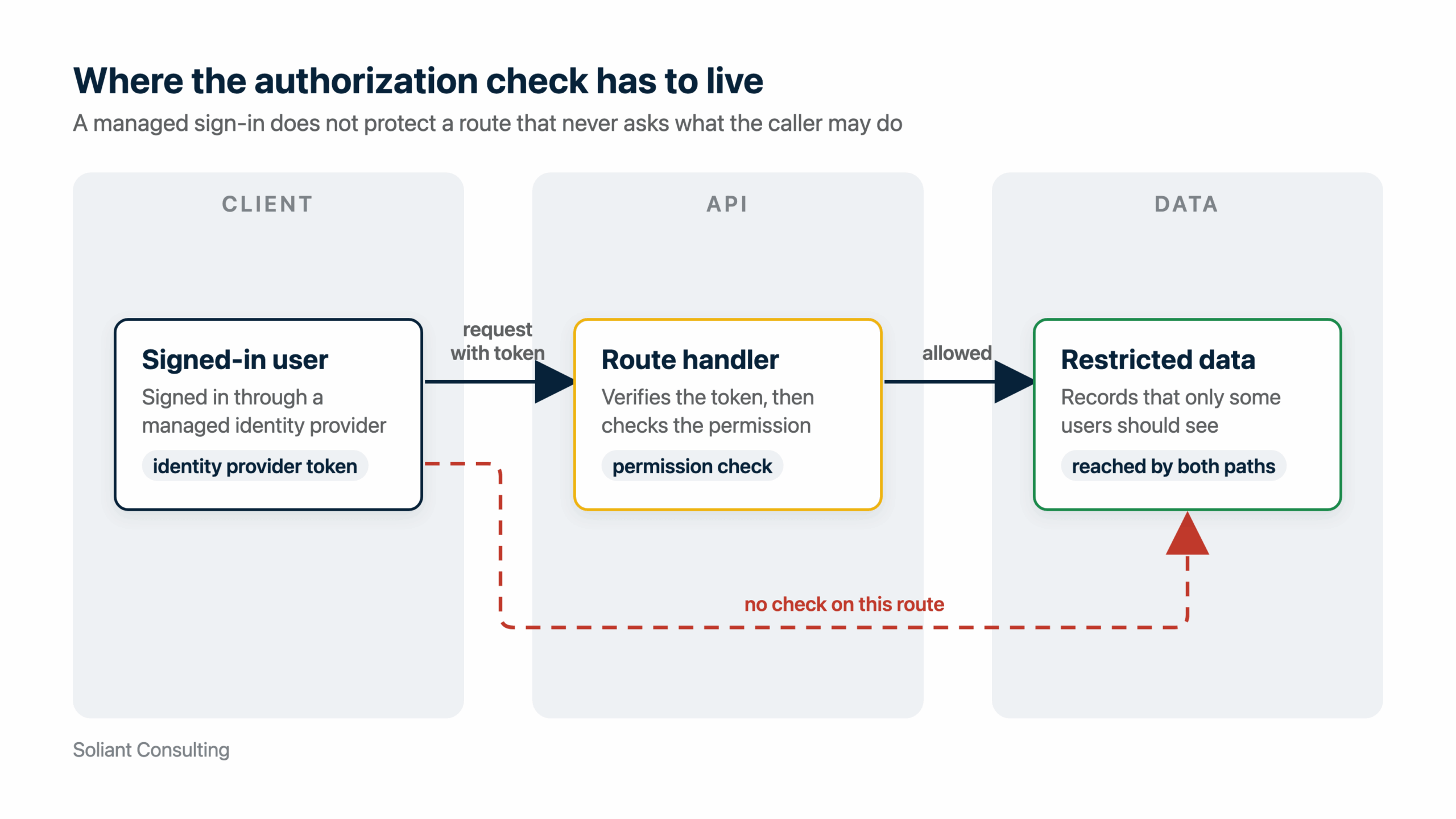
Our APIs verify each token against the identity provider’s published signing keys, then check a permission on every protected route. One deployed API carries that check in 50+ route files. A managed provider still needs care, though. On one production application, role changes didn’t reach the identity provider, and users hit a hang after the login callback, so the integration has to be tested like any other feature. A missing check is a data exposure without a single error in the logs, because the application did exactly what it was built to do.
7. It Started Aging the Day It Shipped
The moment an application is deployed, its dependencies begin to age. A vibe coded application ships with dozens of packages its owner has never heard of, and each one publishes security patches whether or not anyone is watching. Nobody reads the advisories. The next known vulnerability sits there flying under the radar.
At Soliant, we review every application on our Maintenance Plan, the support agreement that covers the applications we maintain, quarterly across ten dimensions. The first three cover cloud infrastructure health, dependency and package updates (outdated packages, known vulnerabilities, and pending major upgrades), and SSL/TLS and domain certificates. The next two cover application security and the Auth0 tenant configuration (multi-factor authentication, brute-force protection, password policy, and callback URLs). Application security alone checks for authentication bypass, broken access control, injection, security headers, cross-origin rules, secret scanning, and validation coverage. The other five cover backup and disaster recovery, observability readiness, cloud performance and cost, front-end performance and accessibility, and technical debt and code quality.
Every new application our team delivers now includes the first year of that plan at no cost. The difference between a scheduled patch and an incident is whether someone was assigned to look. An incident means downtime or a breach on your calendar.
8. The Next Update Breaks the Last One
If the application needs a new field, the owner describes the change and the tool regenerates the screen, or a contractor patches it by hand. Neither one typically knows what else depended on the old shape of the data. The tool may not know why the last change was made, and there’s no regression test to tell either of them what broke. Nobody knows until a user does. Keeping the old field working while the new one rolls out costs little and prevents a rollback.
On our projects we keep regression suites: an API suite of 2,000+ tests on one application, plus browser-driven end-to-end tests. Lint and a full type-check gate every pull request before it merges. Without that safety net, every change costs a full manual retest, and the honest outcome is that changes stop. An application that can’t change is already legacy.
Keeping the Work You Already Put In
None of the above means the vibe coded application gets thrown away. The screens, the workflows, and the decisions behind them are often the most expensive part of a software project, and they’re done. In a transition, the generated application becomes the design reference, which is exactly how our own projects start: mock first, then development and testing against it. Our toolkit even has a mode that adopts an existing generated application, a Lovable export for instance, and adds screens to it in its own style. The design reference keeps growing while the production build starts underneath.
What gets rebuilt is everything underneath. That means an API-first, typed, and validated Node.js and React stack, the one described in our earlier post on Node.js modernization. It means a managed identity provider like Auth0 with an authorization check on every protected route, secrets in a managed store, and containers on AWS Fargate that scale horizontally.
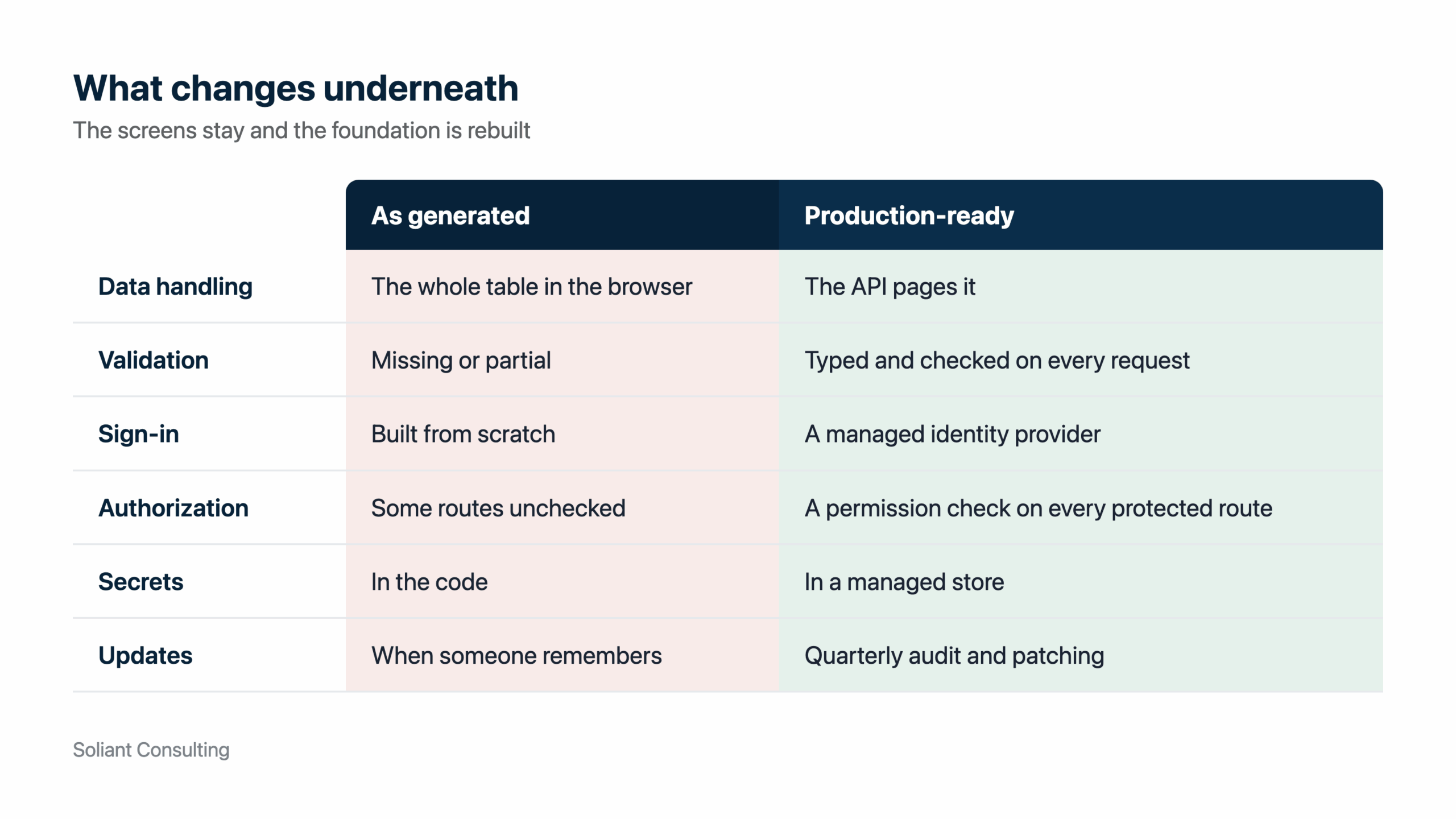
Because the interface decisions are already made, discovery shrinks, and your cost and timeline exposure shrinks with it. As mentioned, quality assurance on our projects tests against the mock. In a transition, your existing application is that mock, so the interface work you paid for pays dividends a second time. The tools themselves are part of our process, and they earned that place. The eight landmines above are what a seasoned developer sees under a surface that looks finished: browser-side data, duplicated records, untyped imports, unchecked layouts, shipped credentials, missing authorization, aging dependencies, and untested updates. Each one has a known fix.
Transitioning Your Vibe Coded Application with Soliant
As your vibe coded application takes on real users, real data, and its first determined attacker, the landmines under the surface stop being hypothetical. Our team has significant experience transitioning vibe coded applications into enterprise-ready, horizontally scalable, and maintainable solutions that keep the interface work you’ve already paid for. We build on Node.js, React, Auth0, and AWS. Contact our team to talk with a consultant about transitioning your vibe coded application.

