
Eleven months ago, staff at a Chicago apparel manufacturer started asking an AI assistant about their orders. Today it answers questions on order status, sales and production planning every day, for dozens of employees and for other AI agents.
Soliant’s Applied AI practice built it with the client’s team, and most of its features came from ongoing conversations with them. Running it in production taught us five things. The biggest is about where an assistant lives.
You don’t have to replace the ERP first
The client is a screen printer and embroiderer. Every order passes through art approval, receiving of the blank garments, production scheduling, shipping, and invoicing, and each step has its own screen in their ERP, which is thorough but not especially fast. “Where is this order?” meant clicking through several of those screens, and recurring reports such as weekly sales by rep could be slow to run and took someone’s time to pull together.
We left the ERP alone. The assistant reads from a custom-built NoSQL read replica throughout the day, so nobody had to wait for a migration project before asking their first question.
Put AI where people already work
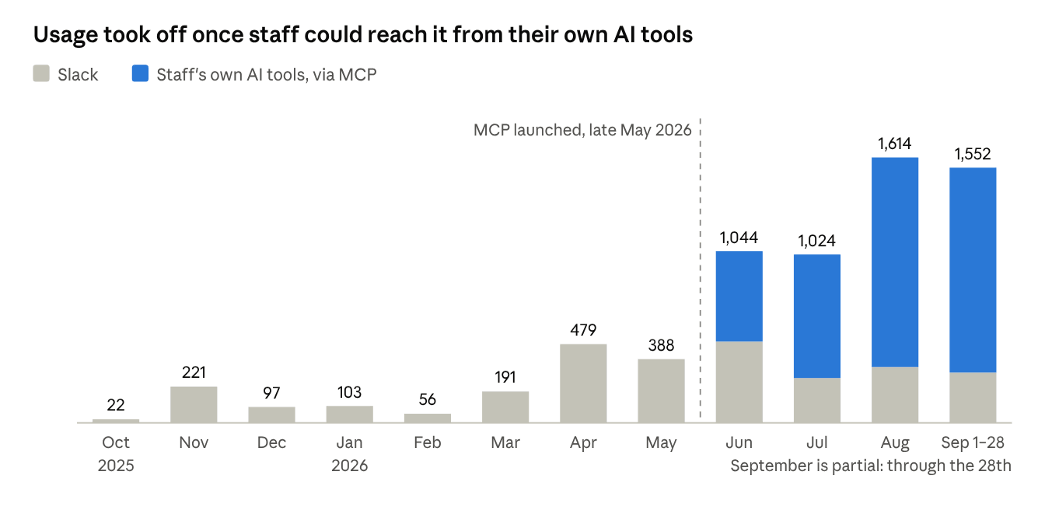
Chat logs, Oct 2025 to Sep 2026 – test accounts and automated traffic excluded
The first version lived in Slack, in the AI Assistant sidebar people already had open all day. We approved users one at a time and onboarded each of them.
In late May, we also published it as an MCP server. MCP (Model Context Protocol) is the open standard AI apps like Claude use to connect to outside tools, so staff could reach the assistant from the company-approved AI apps they already used. Staff were already doing more of their work in those apps, with their own skill files, scheduled tasks, and connections to email, CRM, and other connectors.
Order data now arrived in the same place, and their AI tools could combine it with everything else. Usage jumped within weeks, and most questions now come through those tools. The lesson: expose your system as tools other AI agents can call, instead of building one more place staff have to visit.
Design for AI callers, not just people
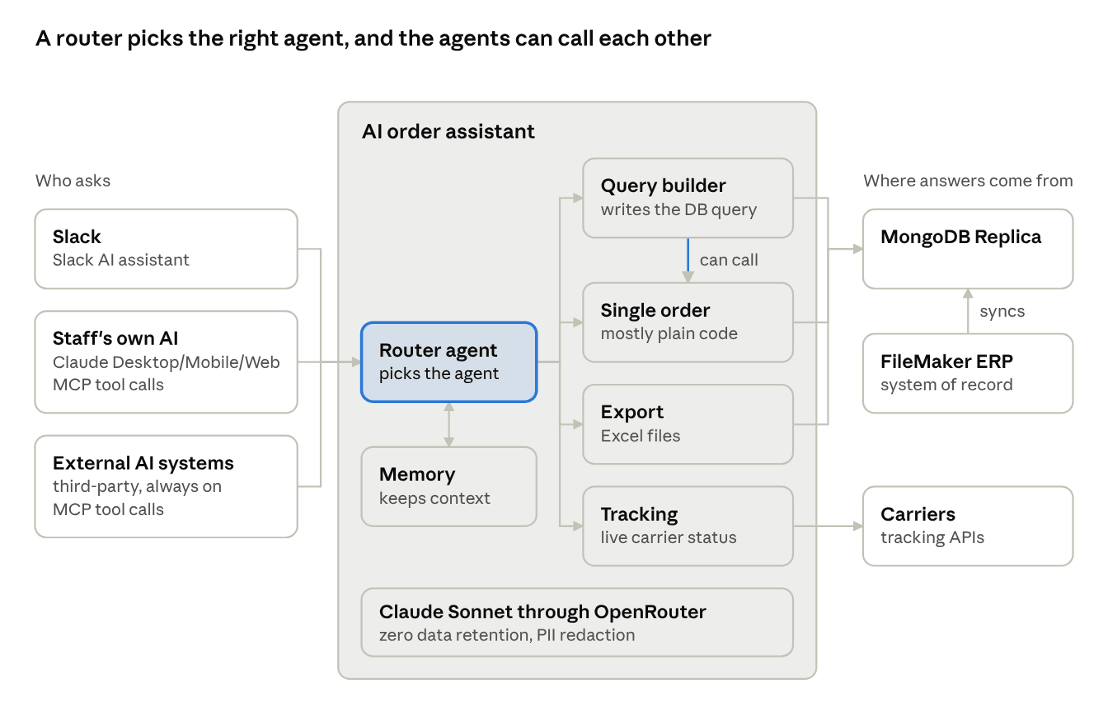
Architecture – router, four specialist agents that can call each other, shared memory, three ways in
Most calls now come from another AI tool or agent: a staff member’s Claude, a scheduled task, or an always-on agent built by a trusted third party. These callers rarely stop at one question. Most of their calls arrive as one step in a chain.
So the assistant is a set of small tools rather than one chatbot. A router hands each question to a specialist agent: one writes database queries, one looks up a single order, one exports to Excel, and one checks carrier tracking. The agents can call each other, and the assistant remembers the conversation.
A staff member’s AI tool gets a FedEx tracking number and nothing else. It calls the tracking tool, then the query agent to find the order the shipment belongs to, then pulls what the customer was billed for shipping to compare against the carrier’s cost. Nobody copied a number from one window to another.
A staff member asks Claude to keep an eye on something, such as a tracking number or an order’s production status. Claude checks it through the assistant on a schedule and alerts them when it changes. It can also draft the follow-up email or Slack message through its other connections.
Small tools also show where a model isn’t needed. The most common request, a single-order lookup, now runs mostly as plain code, which made it faster, more accurate and far cheaper.
Tight controls are what let you open up
Letting outside agents query order data only works if the controls come first. Staff sign in with their company Google accounts, and only approved accounts get in. Every tool call is checked against an access-control list, so each caller reaches only the tools it has been granted.
Every request is logged. The assistant can’t change anything in the ERP, and model calls pass through guardrails with zero data retention and PII redaction. With that in place, adding a new caller comes down to deciding which tools it gets.
Cheap answers change which questions get asked
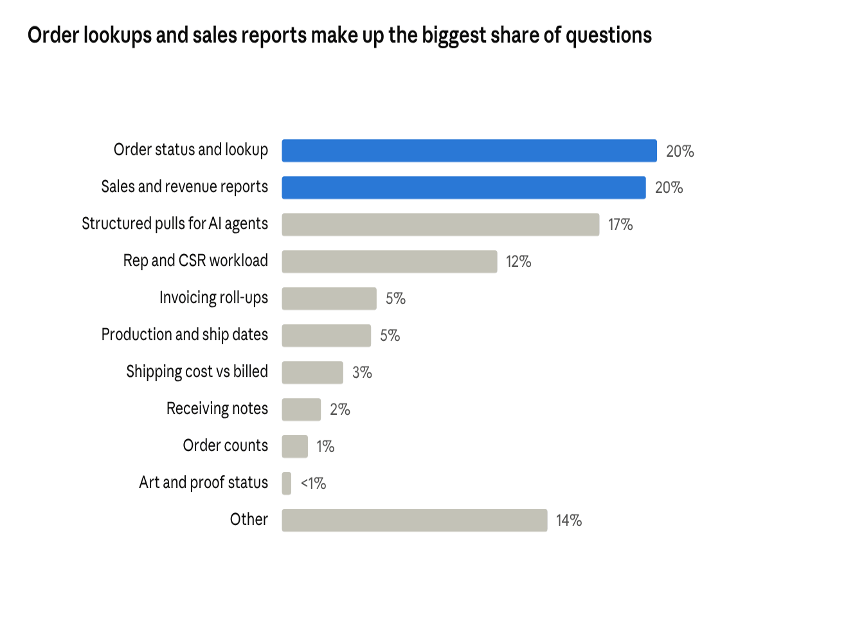
Chat logs, Oct 2025 to Sep 2026 – keyword-classified, approximate
Order lookups and sales reports still lead. A typical one: a staff member pastes a work-order number and nothing else. The assistant replies with where the order stands: it ships in four days, art is underway, and some of the garments are in, with box counts and bin locations from receiving.
The bigger change is in the harder questions. Multi-part analyses, such as year-over-year sales by client or per-rep scorecards, took off once the assistant reached staff’s own AI tools. More than half come from leadership, sometimes mid-meeting: someone asks how Q1 compared with last year’s Q1 by client, and the answer arrives seconds later, before the meeting ends.
When answers are cheap, people ask the questions they used to skip. Measure those new questions, not only the time saved on the old ones.
What’s next
A new replication engine brings the whole ERP within reach, not only orders. After that come agents that can make changes, behind safeguards that keep each change controlled. We keep adding evals and routing each request to the model best suited to it, so cost doesn’t decide which use cases staff can take on.
If your team spends its day hunting for answers across screens, start where they already work. Put your data inside the AI tools they use, control what each caller can reach, and watch which questions they start asking.
Soliant’s Applied AI practice builds systems like this with the people who will use them. When a project calls for it, our engineers embed with your team, learn how the work actually gets done, and build alongside the people who know it best. If you’d like to find where AI could take work off your team’s plate, get in touch.
