
Generating a handful of placeholder records for a FileMaker solution is trivial. Generating thousands of records that look real, respect your schema’s foreign keys, and still resemble what your end users will enter is a problem that usually gets overlooked because it feels like a lot of work.
You’ve probably lived through some version of this: you build a new app, test it with a dozen records, let end users test it, and everything looks great. Weeks or months after you deploy it, complaints start trickling in. A portal scrolls like molasses, a list view takes a while to load, or that dashboard layout you were proud of greets users with a spinning beach ball. These symptoms often result from not testing with a realistic volume of data before go-live.
In this post, I’ll walk through three approaches I’ve tried firsthand for generating realistic, schema-aware FileMaker test data: Claris MCP, the OData API’s batch endpoint, and a preview of the upcoming Agentic Development Toolkit, or ADK.
Key takeaways
- Claris MCP is the quickest way to create a few realistic, schema-aware records, but its built-in tools create one record per call, so token costs climb with volume.
- For thousands of records, have an AI agent write a script that calls the OData API’s batch endpoint. Token cost stays flat because the script, not the agent, does the work.
- FileMaker’s Import Records is also fast, and it works with local, unhosted files.
- Claris’s upcoming Agentic Development Toolkit works with hosted or local files, but FileMaker Pro may become unresponsive while it creates records.
- Once a development copy holds only fake data, you can use any AI tool on it without exposing sensitive information.
Existing Options for FileMaker Test Data
Before getting into those three, it’s worth naming options that have existed for years now. They’re still valid, just not schema-aware:
- Faker-style libraries: produce random but plausible-looking names, addresses, and dates, though they have no idea what your FileMaker schema looks like, so you have to map fields and foreign keys by hand.
- A fully native, scripted approach: my colleague Mislav Kos shared a series of Random custom functions for generating random data back in 2015 (https://www.soliantconsulting.com/blog/test-data-generator/)
Nowadays, asking an AI agent directly, i.e. typing a request into Claude, Copilot, ChatGPT, or a similar assistant is often the fastest way to get a few realistic-looking rows, but like a Faker library, the agent doesn’t know your table structure.
What ties the next three approaches together is that each one is schema-aware: the AI agent generating the fake data can see your tables, fields, and relationships, and generate data that respects them. Let’s start with Claris MCP.
Creating Fake Test Data via Claris MCP
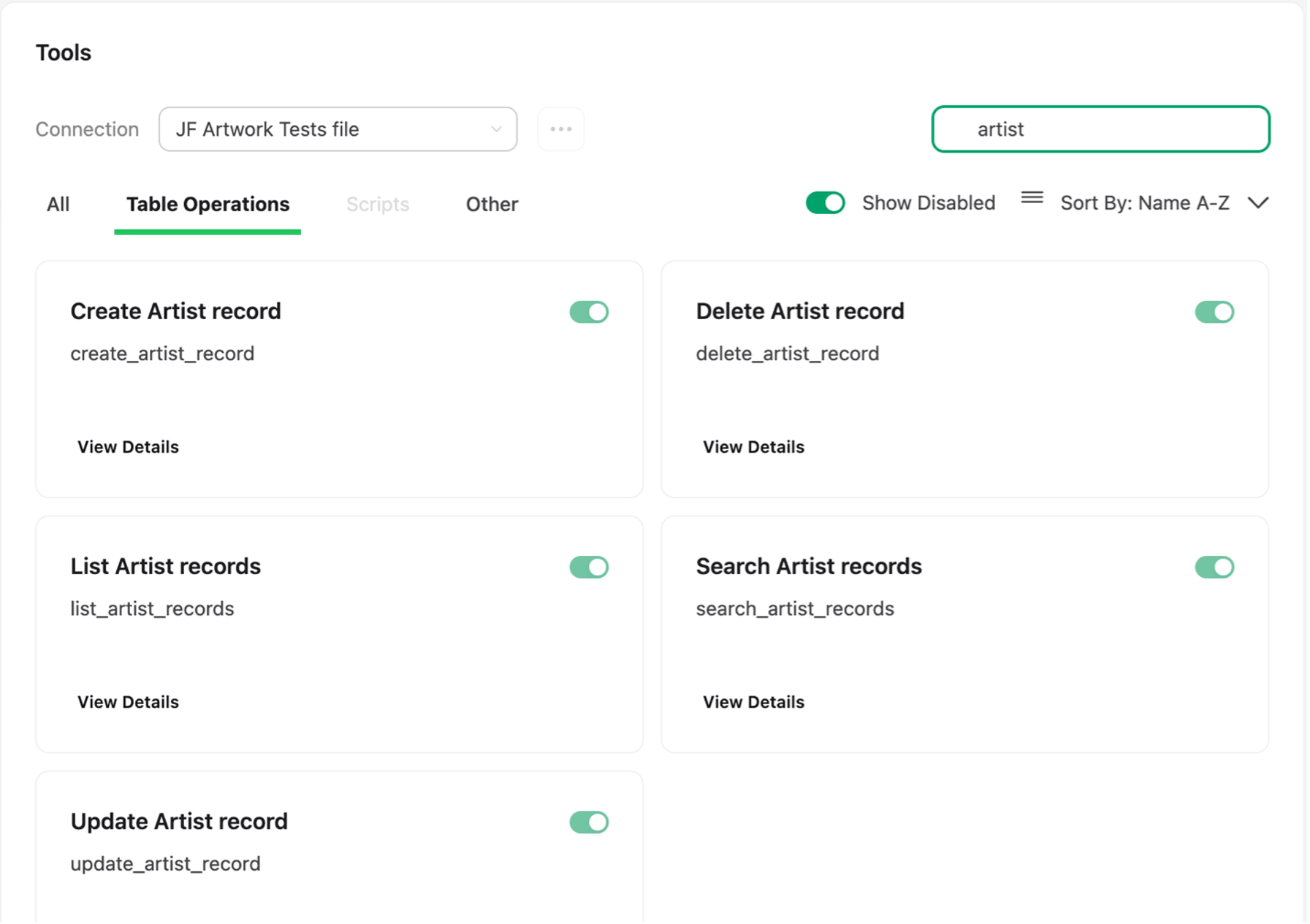
Claris MCP Server, used through Claude Desktop, exposes FileMaker Server’s API endpoints as tools an AI agent can call directly. That includes endpoints to read a solution’s metadata, and endpoints to create and edit records, which means you can describe the data you want in plain language and have the agent create it for you. This approach is quick and easy, and inexpensive, but only if you need relatively few records.
If you have not explored Claris MCP yet, here is a screenshot of a subset of the tools that are exposed automatically when you establish a connection to a hosted FileMaker file, in this case, filtered by the Artist table, which is one of the tables in my test file:
Here’s the actual prompt I gave to Claude Desktop after setting up a Claris MCP connection:
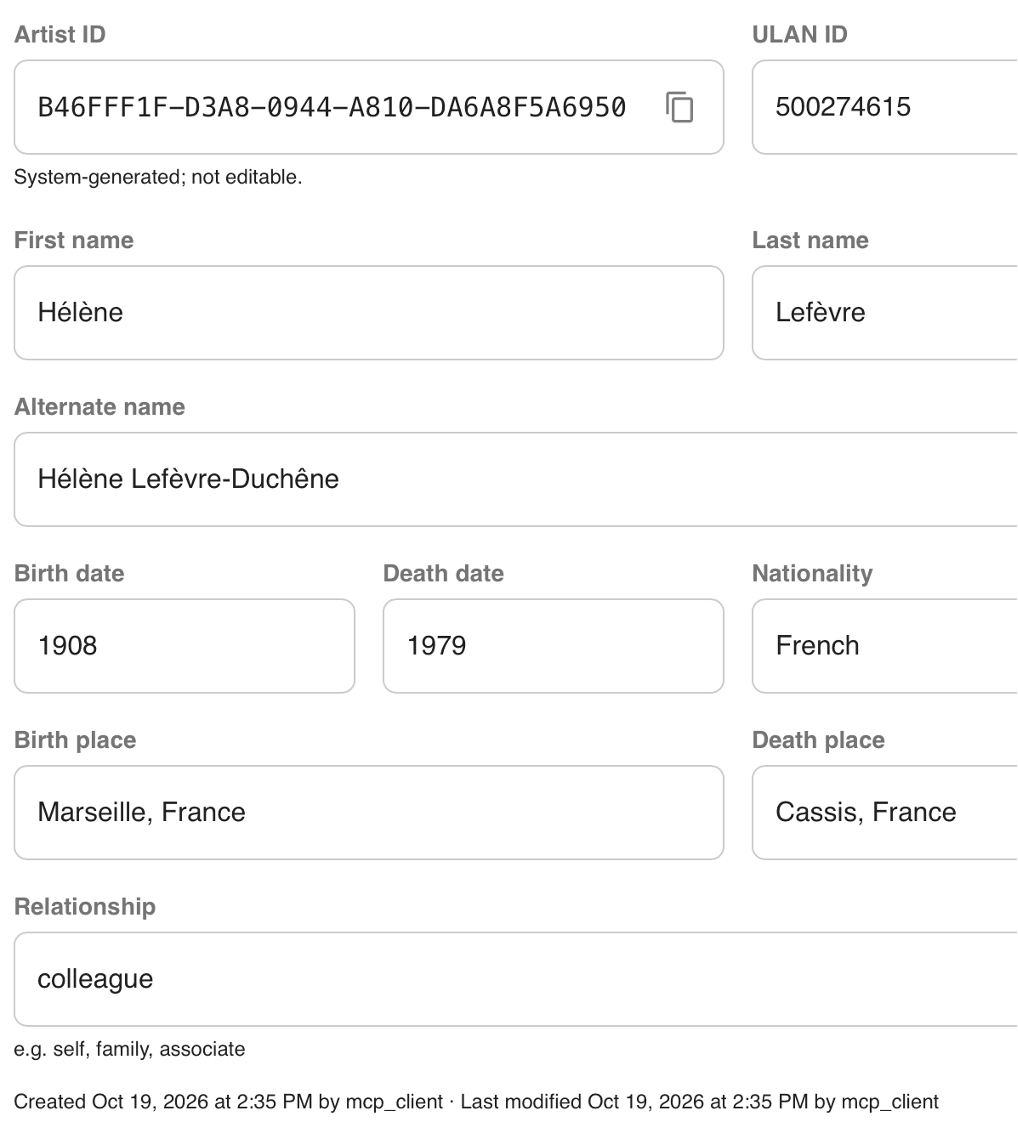
“I want you to generate realistic test data that matches the database schema and existing records. Set every modifiable field in each new record to a realistic value. Create 2 new Artist records, one with a Spanish name and one with a French name. Use non-ascii characters in at least the first or last name of each. Create 3 Artwork records and link them to the new French artist record via the relevant foreign key field. For the required Accession Number field, use the prefix MP- for 2 of them, and MJ- for the 3rd one. Use existing values from the Terminology table to set fields such as work class, work type, and technique. For any 2 of the new Artwork records, create 2 related Photo records for each (make up an S3 object key in each case).”
This single prompt produced two new Artist records, one with a Spanish name and one with a French name, each carrying non-ASCII characters in the name fields, exactly as asked. The screenshot below shows the French artist record, with nationality and birth and death place fields populated along with the name.
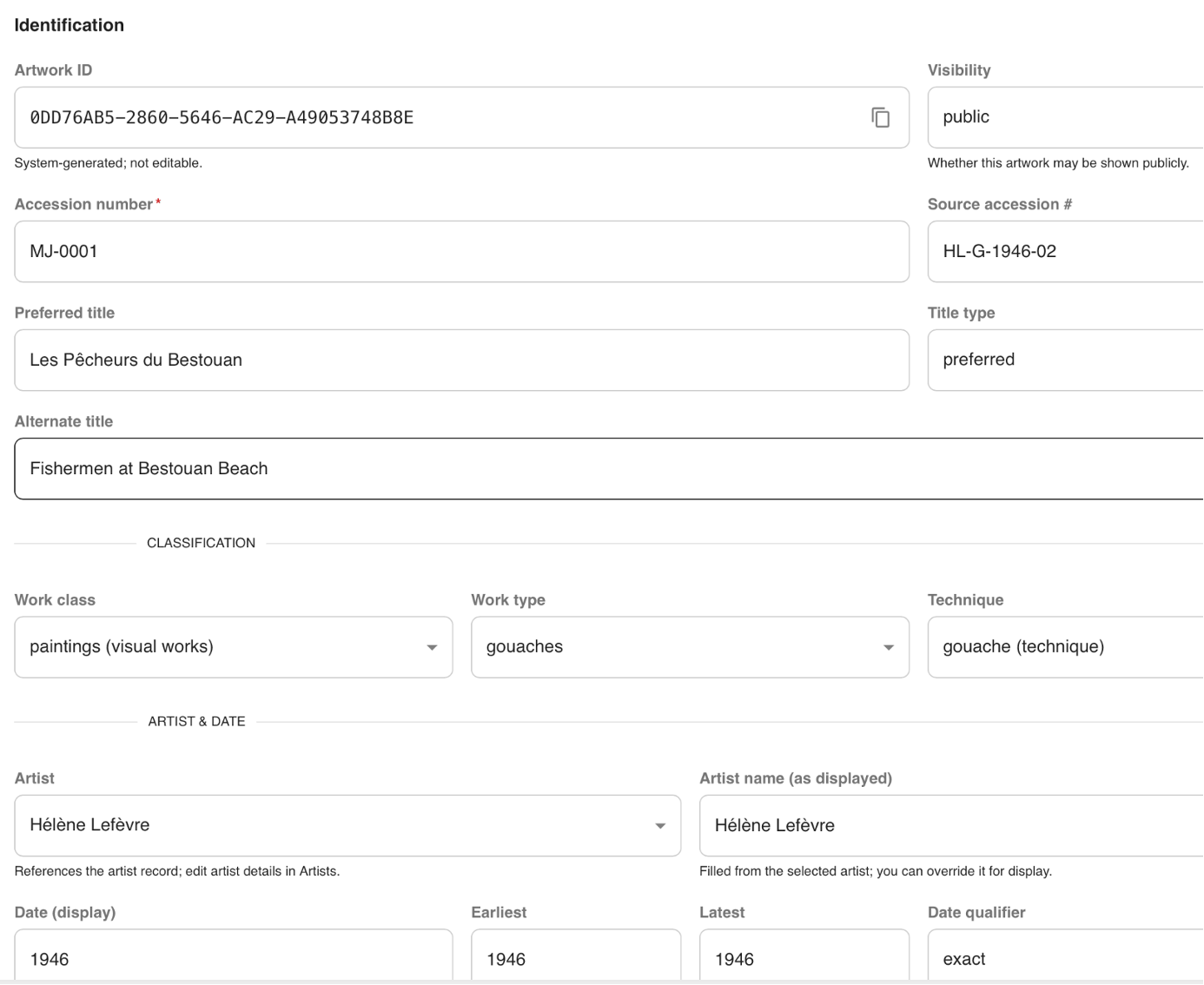
The agent also created three Artwork records linked to that French artist through the correct foreign key, with the accession numbers prefixed MP- and MJ- exactly as I’d asked, and with work class, work type, and technique values pulled straight from the Terminology table rather than invented out of thin air. For two of those Artwork records, it created two related Photo records each, complete with a made-up AWS S3 object key standing in for where the actual image would live in storage.
A few considerations regarding Claris MCP server
When working with Claris MCP and Claude Desktop, at times I have had to restart the OData or Data API processes on FileMaker Server for the connection to start working again. If you make changes to the MCP tools, that requires restarting Claude Desktop for it to have access to the latest tools schema.
Another consideration is that to use the Claris MCP server, your FileMaker Server needs to be publicly available on the internet. If you host your FileMaker Server behind a firewall, you won’t be able to use Claris MCP Server unless you punch a hole in your firewall.
Coming soon: Soliant’s own MCP server for FileMaker
Our team is building our own MCP server for FileMaker. Sign up for the waitlist here.
Testing with an Appropriate Volume of Data
Going back to the scenario I opened with: the only real defense against those complaints is testing early with a volume of data that’s representative of what the app will hold over a reasonable period, not just the dozen records or so we used during development.
Using Claude / Claris MCP to create thousands of records can incur significant cost in AI tokens if using the automatically provided tools in Claris MCP. The reason is that Claris MCP currently automatically exposes tools that create one record at a time, so asking it to generate volume at scale means the AI agent is making that many separate calls, and the token cost of the agent doing all that work climbs right along with the record count. For a few dozen of Artist and Artwork records, that’s a non-issue. For 10,000 Artwork records and the Photo records that go with them, as was the case for an application I recently built, it adds up fast enough that it stops being the quick, inexpensive option it was a moment ago.
The next question then is: what scales better?
Leveraging the FileMaker OData Batch Endpoint
Claris’ FileMaker OData API supports batch requests (https://help.claris.com/en/odata-guide/content/batch-requests.html), which let you bundle many record operations into a single request, i.e. a batch, instead of sending one request per record. I had an AI agent write a Python script that calls that batch endpoint directly rather than going through the Claris MCP Server.
Here’s the command I ran to kick off a sizeable batch using the aforementioned Python script:
python3 load_test_data.py --artworks 10000That one command created 10,000 Artwork records and 100,000 Photo records, all still matching the shape and realism I’d described to the agent. This is a performant approach if raw volume is the goal, because the batch endpoint, not the AI agent, is doing the heavy lifting, so token cost stays flat no matter how many records you ask for. In other words, I used AI tokens not to make calls to MCP or the OData API, but rather, to create a deterministic tool that can be used repeatedly, without incurring additional token costs.
Having said that, this approach still requires the FileMaker file to be hosted by FileMaker Server, since the OData API, like Claris MCP, talks to a live FileMaker Server instance rather than a local file.
FileMaker imports are fast too
If you want to create large volumes of data, especially into a local FileMaker file, the good old Import Records option can be a very performant approach too. If you need to create fake data in multiple tables, you will need to run one import action for each table, which would slow down the overall process, but the import process itself can be very fast. You – or the AI agent – will need to set the appropriate primary and foreign keys in the CSV (or whatever file format you use) file(s) to be imported.
The import process can certainly be scripted, but traditionally this means additional manual work on our part (see next section). If you run such a script locally, it will take over your FileMaker Pro session, unless you run it using another FileMaker Pro version, or you run it on another machine.
A Preview: The Upcoming Agentic Development Toolkit
Everything above is available today to anyone in the Claris community. Claris is also working on something not yet generally available, the Agentic Development Toolkit, ADK or toolkit for short, and I got to try two different ADK-based approaches to the same test data problem. For background on where Claris is headed, see Claris Just Made FileMaker an AI Development Platform.
Installing the toolkit installs 2 components. There’s the FileMaker CLI, a new headless client for FileMaker, and there’s the toolkit itself, which requires the FileMaker file, hosted or not, to stay open during the AI agent’s working session. The FileMaker CLI is for authoring schema. This matters because this blog post focuses on generating fake data using tools that understand our solution’s schema. The FileMaker CLI cannot be used for writing data; for that, I used the ADK itself, so both approaches I tried below go through the ADK itself, i.e., with the file open the whole time.
When you connect a FileMaker file to a toolkit-based project, as of this blog post’s writing, the beta version of the toolkit I used adds a handful of utility scripts to that file to give the AI agent a consistent way to talk to it.
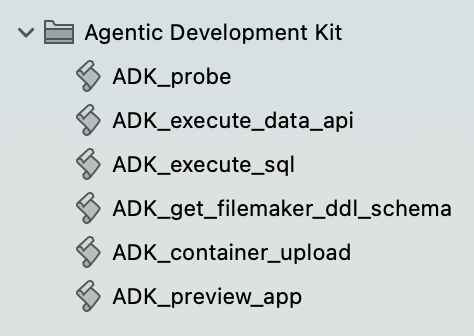
In a file where I already had layouts named dapi_<entity_name>, Claude and ADK automatically suggested the first approach: calling the ADK_execute_data_api utility script added by toolkit, which effectively runs the Execute FileMaker Data API script step against the open file. The second approach skips that utility script and instead has Claude and ADK write a brand-new FileMaker script to create the test data directly. In both cases, a helper Python script got created in my project workspace behind the scenes (in my case, I used Visual Studio Code for the development environment). With ADK_execute_data_api, that helper Python script captured the test data and called ADK’s run script command to invoke the utility FileMaker script. With the new FileMaker script approach, the helper Python script’s job was to feed the generated test data into an Insert Text step inside the new FileMaker script.
Improving performance of the Data API approach
To speed up the creation of records when using the Execute FileMaker Data API approach, I added a portal into Photo to my dapi_Artwork layout. Whereas the Execute FileMaker Data API step does not support batch operations like the OData API does, it does support creating related records through a portal on a layout. It took 0.36 seconds and 0.39 seconds to create a given Artist or Artwork record, respectively, whereas it took 0.11 seconds per record to create Photo records through the portal. In lieu of an actual batch operation, this was a way of speeding up the creation of test data.
As a side note, script ADK_execute_sql was automatically used in both cases by Claude (guided by the toolkit skills) to query the file directly and confirm the data had actually been created the way I’d asked.
It’s worth pointing out that with the toolkit, the FileMaker Pro client became unresponsive at times while the records were being created. I think that’s worth factoring in if you try the toolkit for this before it’s generally available: it works, but your FileMaker Pro window may not stay very usable while the toolkit is working.
Comparing Approaches to FileMaker Test Data and Picking the Right One
Here’s how the approaches compare at a glance:
| Approach | Needs FileMaker Server? | Best For | Effect on Your FileMaker Pro Session |
|---|---|---|---|
| Claris MCP | Yes, reachable from the internet | A few records described in plain language | None; runs outside the file |
| FileMaker OData batch endpoint (AI-written script) | Yes | Large volumes, with flat token cost | None; runs outside the file |
| FileMaker Import Records | No; works with local files | Large volumes (one import per table) | A scripted import run locally takes over your session |
| Agentic Development Toolkit (preview) | No; hosted or local, but the file must stay open | Reusing existing Data API layouts, or getting a new script you can modify | FileMaker Pro may become unresponsive while records are created |
An advantage of both Claris MCP and the direct OData batch approach is that neither one interrupts your work in FileMaker Pro at all. The AI agent and the API calls happen entirely outside the file you are working on with the FileMaker Pro client. The arguable downside of that, however, is that they do require the FileMaker file to be hosted by FileMaker Server; neither works against a local, unhosted file.
If raw volume is what you need, the FileMaker OData batch endpoint or a native FileMaker import might be the most performant options.
You could also try combining approaches, e.g. if you need to generate large volumes of data in an un-hosted file, and want to maximize record creation performance, you could agentically generate the csv files containing the data to import via a toolkit-generated FileMaker script(s). Another example would be exposing FM scripts – agentically written or not – as MCP tools.
What approach is used to generate fake test data will probably also depend on what tools a given FileMaker developer is most familiar with, and what infrastructure may already exist in the FileMaker file. For instance, if, like in my case, you are already using Execute FileMaker Data API to collect data to bootstrap a web viewer, and already have the layouts and relationships to support that approach, using the toolkit and utility script ADK_execute_data_api can be a natural approach. Conversely, if you have not used the Execute FileMaker Data API script step much, and/or you want to have full control of how the data is created in FileMaker, you might favor using ADK to create a new script that then you can modify as you wish.
Conclusions: Test Early with Realistic FileMaker Test Data
Testing a solution early in development with data that’s both realistic and sufficient in volume surfaces the validations and logic you need to implement before an end user reports them as bugs or performance problems. I’ve found AI very good at generating that kind of realistic test data, as long as you give it sample data (or even minimal guidelines for what the data should look like) and access to your database schema. The Claris platform supports several ways to create test records, and I think the best option depends on the project, so pick the approach that fits rather than defaulting to the same one every time.
There are two other important advantages of using fake data in development copies of your apps:
- Once all of your test data is fake data, you can freely use any AI tool against your development copy of the app, as far as record data is concerned. You don’t have to worry about sensitive data accidentally making its way to an AI vendor, since there isn’t any real data in that copy to begin with
- Similarly, if the production data contains sensitive information, you may not be allowed to, or you may just not want to, ever store such data in your local machine or your development server
If you want help building a realistic test data strategy for your FileMaker solution or want to know more about what the toolkit can do, contact our team to talk with FileMaker consultants who already have hands-on experience with these AI-driven approaches.
A final note: data types gotchas when using Claris MCP or OData API
There are edge cases involving large numbers, decimal values with many precision digits, dates in different locales, line endings, etc., that when such data is pushed to FileMaker via Claris MCP or the OData API, the data stored in FileMaker may be different than the data sent.
Keep an eye out for a follow up blog post that focuses on such edge cases. In the meantime, you can find good clues in this regard in this existing blog post: https://www.soliantconsulting.com/blog/filemaker-json-serialization/
Frequently Asked Questions
How do you generate realistic test data for a FileMaker solution?
Give an AI agent access to your schema plus some sample data or basic guidelines, then have it create records through Claris MCP, through a script that calls the OData API’s batch endpoint, or through Claris’s upcoming Agentic Development Toolkit. Because the agent can see your tables, fields, and relationships, the records respect your foreign keys and can reuse existing values, such as those in a terminology table.
Can Claris MCP create test records in FileMaker?
Yes. Claris MCP Server exposes FileMaker Server’s API endpoints as tools an AI agent can call, including tools to create and edit records. It works well for a handful of records, but its built-in tools create one record at a time, so token costs climb with volume. It also requires FileMaker Server to be reachable from the internet.
What is the fastest way to create thousands of FileMaker test records?
Use the FileMaker OData API’s batch endpoint, which bundles many record operations into one request. Have an AI agent write the script once, then rerun it without additional token costs. In the example above, one command created 10,000 Artwork records and 100,000 Photo records. For local, unhosted files, FileMaker’s Import Records is also fast.
Why use fake data in development copies of a FileMaker app?
When a development copy holds only fake data, you can use any AI tool against it without worrying about sensitive data reaching an AI vendor. You also never need to store sensitive production data on your own machine or development server.
