
FileMaker 2026 introduced 2 changes to the Insert from URL script step, namely, JSON responses are automatically parsed and cached, and cURL option -- proxy-ntlm is now supported.
In this post, we’ll dive into each of those changes.
JSON Responses Are Automatically Cached
As a refresher, much like FileMaker has to parse the text representation of a date, say, in order to add up 2 dates, it also has to parse the text representation of a JSON structure in order to inspect or operate on that JSON structure.
Having said that, when the response from executing an Insert from URL script step is JSON, if you specify the Insert from URL target as a variable, that variable is now set to both the text and binary representations of the JSON response. Prior to FM 26, it was set to just the text representation.
In other words, Insert from URL now automatically applies function JSONParse( json ) to the response – see documentation for JSONParse( json ). Which means that for valid JSON responses, if you apply JSONParsedState ( json ) to the Insert from URL target variable, you’ll get an integer greater than 0 – see documentation for JSONParsedState ( json ). See screenshot for an example.
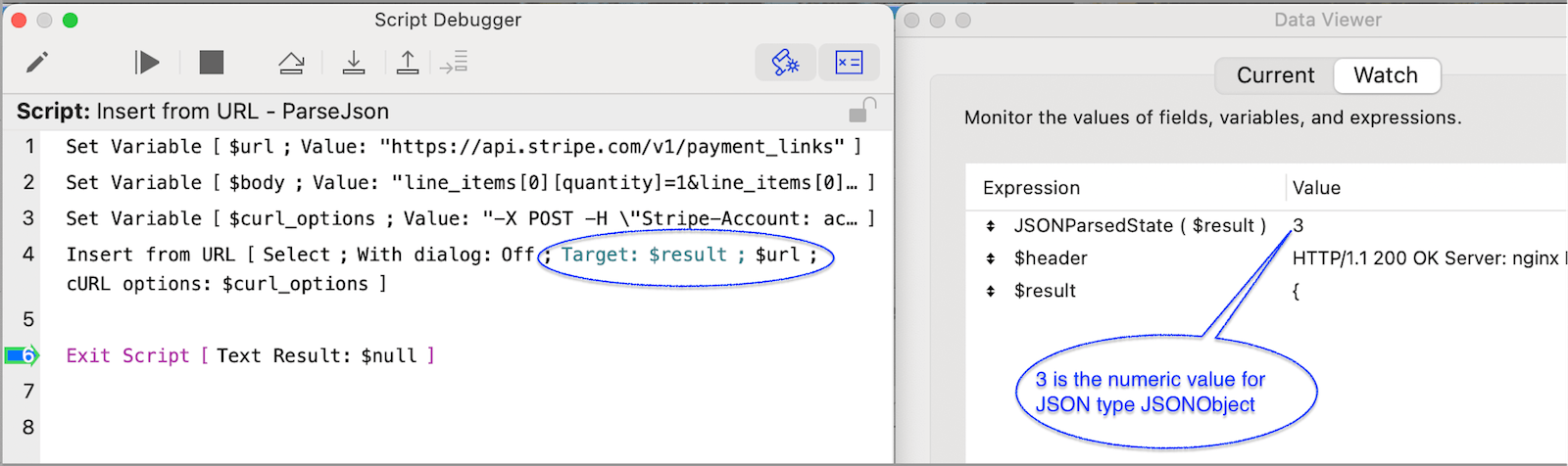
JSONParse
JSONParse( json ) was introduced in FileMaker 2025. Its purpose is to allow FileMaker developers to store in memory – in a dedicated variable – a parsed (aka binary) representation of a JSON structure. This represents a helpful alternative to FileMaker’s traditional single, global caching for JSON structures, which is overwritten every time one of the JSON functions is used to generate a new JSON structure.
Converting the JSON text representation into a binary representation requires computational resources. Therefore, the ability to parse and store in memory the binary representation of multiple JSON structures at once can result in improved performance. This is especially true when needing to inspect and/or operate on different JSON structures in a loop, say, especially if those structures are large in size.
To learn more about JSONParse( json ), please refer to this in-depth blog post on JSONParse ( json ) by my colleague Mislav Kos.
If instead of setting the Insert from URL target to be a variable, you set it to be a field, then the parsing of the JSON is meaningless, since JSON is stored only as text in a FileMaker field.
Is this automatic caching a good thing?
I think it depends. If the JSON response will be manipulated or inspected in the same script or script sequence in which it is obtained, parsing it and caching its binary representation may be beneficial from a performance standpoint. And it can be a nice convenience for developers, so we don’t have to explicitly apply JSONParse ( json ) every time.
On the other hand, if we are not going to operate on the JSON response, parsing it into its binary representation is unnecessary. If we’ll just inspect the response in the Data Viewer when developing/troubleshooting the script, or write it to a field, or send it elsewhere, all we need is the text representation of the JSON. Depending on the size of the payloads and the number of payloads processed in a given time period, automatically parsing JSON structures when it’s not necessary could result in an undue performance hit.
In my opinion, it would be best to include a configuration option in the Insert from URL script step, such that the default value is to parse and store in memory the binary representation of the JSON response, and give us the ability to turn that behavior off for any one Insert from URL script step.
Support for NTLM Proxy in cURL Options
NT LAN Manager (NTLM) is a suite of Microsoft security protocols designed to authenticate users’ identity and protect the integrity and confidentiality of their activity. At its core, NTLM is a single sign-on tool that relies on a challenge-response mechanism that proves to a server or domain controller that a user knows the password associated with an account.
NTLM authentication is still supported and must be used for Windows authentication with systems configured as a member of a workgroup. NTLM authentication is also used for local logon authentication on non-domain controllers1.
Having said that, NTLM is largely considered a legacy protocol with well-documented weaknesses. NTLM was replaced as the default authentication protocol in Windows 2000 by Kerberos, though it remains supported across all Windows systems for backward compatibility with legacy clients and servers2. For organizations still running it, NTLMv2 offers stronger encryption, timestamps, and better resistance against credential replay than the original NTLMv3. However, NTLMv2 is still considered a legacy protocol, and Microsoft recommends migrating to Kerberos or other modern authentication methods. Beyond Kerberos, modern alternatives include OAuth 2.0 and OpenID Connect for web and cloud-facing services, as well as SAML for enterprise single sign-on scenarios.
Why use NTLM if there are more secure alternatives?
NTLM is effectively still in use, enough so for Claris to decide to provide support for proxy NTLM servers. One common use of NTLM in enterprise networks — particularly those built around Microsoft Active Directory infrastructure — is to route outbound internet traffic through a corporate HTTP proxy that requires NTLM authentication before allowing connections through. This way, IT administrators can monitor and control all outbound traffic.
When a client makes a request to such a proxy without the correct authentication scheme, the proxy returns an HTTP 407 Proxy Authentication Required response. The --proxy-ntlm option tells cURL to perform the NTLM challenge-response handshake specifically against the proxy, rather than the destination server.
If you find yourself needing to support a FileMaker application that needs to communicate with an NTLM proxy server, we now have the necessary tools to do so natively in FileMaker.
How NTLM Works in FileMaker
Let’s look at an example Insert from URL script step that needed to interact with an NTLM proxy server. In the screenshot above used to demonstrate the new, automatic use of JSONParse, we called a Stripe API endpoint to create a Stripe payment link. In that case, we used these cURL options in the Insert from URL script step:
--request POST
--header "Stripe-Account: <<stripe_account_here>>"
--user <<api_key_here>>
--data @$body
If we needed to make that same API call from inside a network that routes outbound traffic via an NTLM proxy, our call would then look something like this (with annotations):
--proxy http://proxy.company.com:8080		// proxy ntlm server and port
--proxy-ntlm					// new cURL option supported by FileMaker
--proxy-user "DOMAIN\username:password"	        // the network’s domain name, user account, and password
--request POST
--header "Stripe-Account: <<stripe_account_here>>"
--user <<api_key_here>>
--data @$body
The URL specified in the Insert from URL script step would be the same, i.e. the URL of the resource that we are ultimately trying to reach, NOT the URL of the proxy server. In this case, that URL is https://api.stripe.com/v1/payment_links.
Navigating in New Opportunities in FileMaker 2026
If you’d like more insights on how new features and changes in FileMaker 2026 can benefit your FileMaker application, our FileMaker team can help. Contact us to get started.

