
FileMaker work is rewarding. Puzzles arise from client needs, and the task of solving the problem can be tough. But once the solution presents itself, the work can be very satisfying. Not only does it solve a client’s need, but it is the culmination of some hard thinking, and that, in of itself, is worth it.
Case in Point
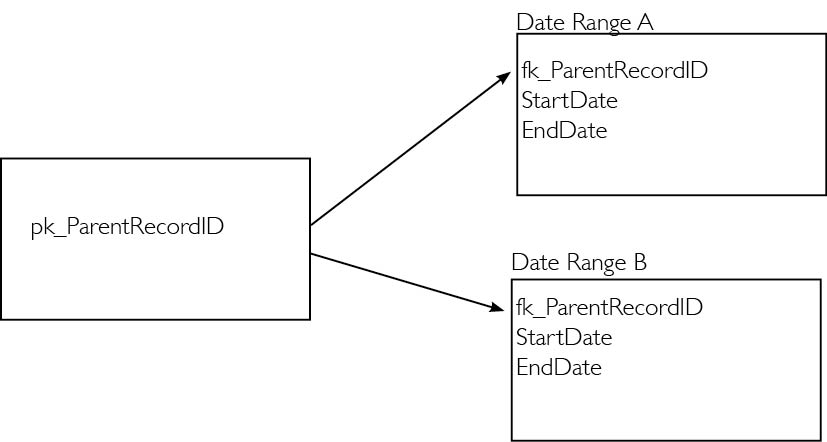
I was working with a client recently on reporting. We had some complicated ExecuteSQL-created, Virtual List reports that gathered data from all over the solution into one layout. Late in development, the client realized there was a need to see if two related date ranges overlap each other, and if they do, include the parent record in the report (see Figure 1).
Read about using the visual list technique: Part 1 and Part 2.
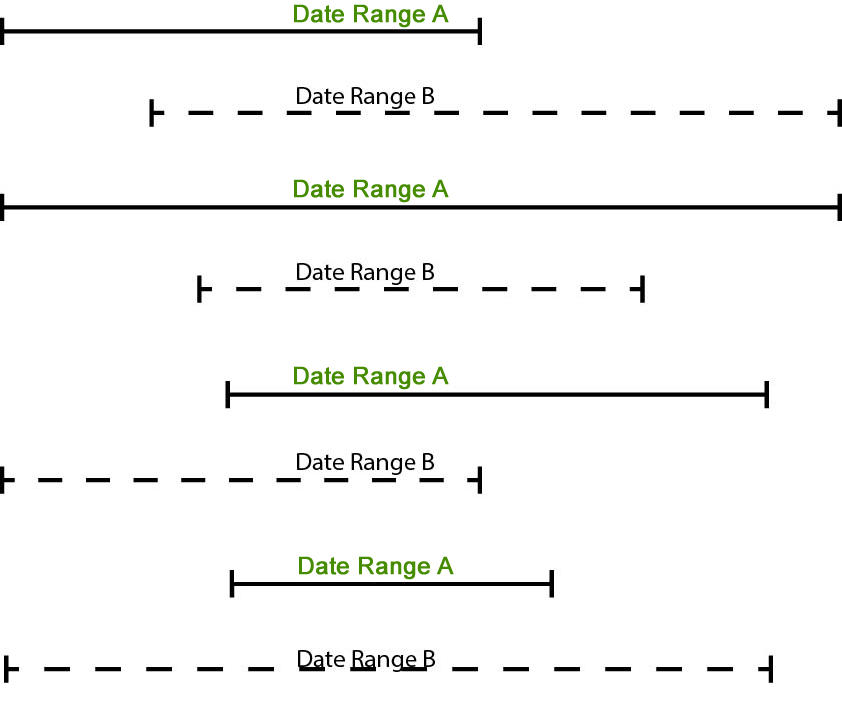
We made a sketch of the date ranges as shown in Figure 2. There were four possible combinations of two date ranges overlapping. It seemed like a lot of work to be able to compare date ranges with these four possibilities.
We made a sketch of the date ranges as shown in Figure 2. There were four possible combinations of two date ranges overlapping. It seemed like a lot of work to be able to compare date ranges with these four possibilities.
I wasn’t too thrilled about having to add to my already complex ExecuteSQL statement, so I decided to do what everyone does: google this problem to see if someone had a better way to see if date ranges do indeed overlap.
Researching Overlapping Date Ranges
In the FileMaker world, the search “overlapping date ranges” turned up some great advice by veteran developers on the various FileMaker forums. Those answers involved extra relationships and complicated queries. Using ExecuteSQL, I might be able to do this by joining the DateRangeA and DateRange B tables together and writing up the possible overlapping scenarios in the WHERE clause.
I turned my attention to programming, in general, to see if others had different solutions. It turns out people on other platforms have this problem. The StackOverflow community provided some useful answers, but they too involved a complicated SQL query.
Potential Solutions
One brief answer pointed to the best solution: Instead of trying to query for all the possible ways in which two date ranges could overlap, think of the scenarios in which they do not overlap. Low and behold, there are only two: Date Range A ends before Date Range B begins or Date Range A starts after Date Range B ends.
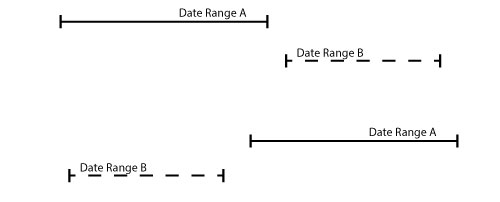
If one of these is true, then the two date ranges do not overlap. The simple formula is posted as:
(EndA <= StartB or StartA >= EndB)The answer posted further pointed to a Wikipedia article on the math behind this theorem. It is a pretty interesting read, and I understood most of it.
Anyway, I was interested in the opposite if the result of the above calculation, so I rewrote it to return the inverse.
If ( NOT (EndA <= StartB or StartA >= EndB) ; “Overlap”)This function will return “Overlap” when it is not true that the two date ranges do not overlap.
Like a magic trick, the revealed secret looks very simple and mundane. But this solves a huge problem for me. All I have to do feed into this calculation each date range start and stop time and the calculation lets me know if they overlap. If a parent record has two date ranges that overlap, the script will include that parent record on the report.
To test this out, I put together a demo file. I turned the calculation above into a custom function and passed in the start and end date of two date ranges. It returns TRUE if the date ranges do overlap.
_IsOverlap ( StartA ; EndA ; StartB ; EndB )Demo File
I created some test records with start and end dates in the two ranges, fed in the parameters. Very simply, the calc determined if they overlapped.
In the first example, the date ranges overlay.
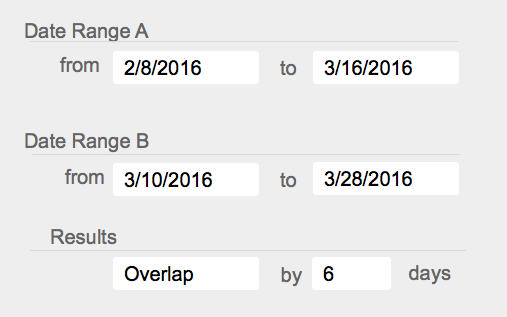
In the second, they do not overlap.
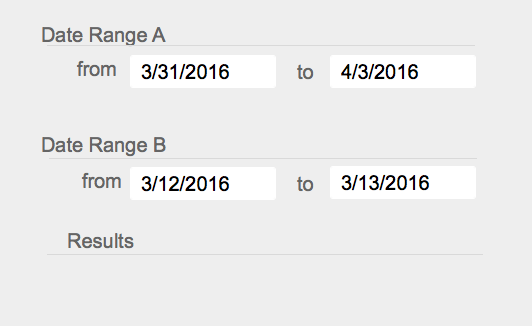
It’s amazingly simple but powerful!
In the example file I created, every date range has an end date. That may not always be true in the real world. If Date Range A is still active, the end date hasn’t been determined, so no date is in that field. I overcame that slight issue by passing in the absurd date of 1/1/4000 as the end date. That solved the issue.
Side note: This function works very well when I can compare dates set in the same country. I’m sure this would work well for other matching time units, but I did not focus my testing on other units of time.
Extending the Idea
The stackoverflow.com answer referred me to a cool extension of this work.
Here I learned that I can calculate the number of days in which the two date ranges overlap. It says that the number of days overlap will always be the minimum of one of the four calculations.
Min (
EndA - StartA ;
EndA - StartB;
EndB -  StartB;
EndB -  StartA
)
Practical Uses
All of the descriptions above are a bit abstract. However, this technique has potential to solve problems commonly found in FileMaker solutions. Here are a few.
- Ensure that an appointment for a person does not conflict with already existing appointments.
- Determine when two people are enrolled in the same course at the same time.
- Determine if two time-off requests for the same person overlap, or if two requests in the same department overlap.
There are plenty more uses.
Conclusion
Looking outside of the FileMaker world into general programming, I was able to find a simple technique to a problem that seemed daunting when visualized. Using this technique in FileMaker, I was able to very easily see if two date ranges overlap. And, if I wanted to, I could determine the number of days the two ranges overlap.
This useful technique is simple yet powerful and has many possible uses.
Watch our videos for more FileMaker tips and techniques:
Moving Forward
Do you have any questions about other puzzles within your FileMaker solution? Our team of certified FileMaker developers has helped many organizations address complex challenges in their implementations, and we’re happy to provide additional insights on how we can help your team. Contact us to set up a quick phone call today.


Jeremy thank you for the writeup. I had to solve these same problem for a price ranges, which is a bit easier. But I did not look into the inverse function. Great thinking! Great work. Thank for sharing.
Thanks for the comment. I must admit, someone else already thought it for me. I just ‘discovered’ it and applied it to FileMaker. I’m sure it will work for price ranges too. That’s a great idea.
I don’t see demo!
Hi. I didn’t post a demo because its rather rudimentary. The functions are listed in the post. But I can add the demo to the post. Thanks for the feedback.
Thought-provoking. Thank you.
above example can be rectified as
select datediff( if(@ReportStartDate>=a.d_TermStartDate,@ReportStartDate,a.d_TermStartDate),if(@ReportEndDate <=a.d_TermEndDate,@ReportEndDate,a.d_TermEndDate) ) * -1
— Considration i have taken
— StartA = @ReportStartDate, EndA = @ReportEndDate
— StartB = d_TermStartDate, EndB = d_TermEndDate
this would be more easy . thanks for your help
Thanks for sharing this Jeremy – it has saved me a lot of time on researching and has numerous applications in relation to the somewhat complex task of resource scheduling. A truly elegant solution.
Great stuff. I applied it yesterday with time ranges, it works in exactly the same way. You’ve combined 2 great techniques in one fantastic blog article. Thank you.
Thanks Peter for the kind words. I’m glad it works for Time Ranges as well.
Brilliant! Just what I needed to work with my calendar, thanks for the effort and the explanations.
“But once the solution presents itself, the work can be very satisfying.”
–> Just enjoyed a moment of content seeing my validator-script running nicely 🙂
I ended up combining dates and times into one numerical so I could easily check for ranges over multiple days using the given formula.
Hi Henning. Thanks for the kind words. I like your idea of combining the dates and times into one number.
Thanks
What a great solution Jeremy. I just tested a basic booking system including an available asset picker for the proposed booking.
I made a global booking date start and date end field . I used then your function on the existing booking dates v the proposed booking date globals. I added an asset id field for overlap items and another match for product id (using a product id global in the booking table). I then used a list summary field of the overlap asset id as the join to an assets TO. With a little refresh portal love I have an available Assets picker for the desired date range.
How would you do that? 🙂
This is great – simple yet effective. Thanks for the CF’s too!
Jeremy – I found a need to be able to compare a pair of dates against a whole set of other dates – and managed to do this by adapting your Custom Functions in the demo file into a new recursive function. Let me know if you’d like to see your modified demo file with the changes…
Hi James.
That’s awesome that this will work for comparing a pair of dates against a whole other set of dates. I’d love to see your demo. Send it to me at jbrown@soliantconsulting.com
Thanks. I look forward to seeing it.
(though I must admit you got me intrigued. I’m not the most fluent at writing recursive CFs, so I’m going to tackle it as well and see if I can figure it out! Such a fun thing to do on a Friday afternoon.)
Thanks, this has been very useful. I did this many times with listing all the possible ways it can overlap, but I decided to google this time and I never thought of doing it in reverse, it’s so much simpler (and can basically be summarized with “if one of them ends before the other start, it doesn’t overlap”, which is easy to remember and quite logical)
Depending on your definition of overlap though the formula can cause an issue.
If you say that it does not overlap when (EndA = EndB), it will consider that there is no overlap when they end up on the same date.
For instance, 2017-08-01 to 2017-08-05 does not overlap with 2017-08-05 to 2017-08-10. But this is not necessarily the behavior you want (it was not in my case), so it might be good to add a note about it. In my case the formula I wanted was (EndA EndB), because I consider one range ending on the day the other one starts to be an overlap (and it seems to me that in many cases that’s how you’d want to consider it too).
If you want to look if hotel rooms are available, you want the >= because a reservation ending on the 3rd and another starting on the 3rd is not an overlap.
But if you want to look at say if a special price applies, well if it ends on the 3rd, it overlaps with the 3rd.
Sorry if none of these examples are in anyway related to filemaker!
Hi Patrick,
I agree with your comments in this and the next post. Since it depends on what ‘overlap’ means for your particular use case, then the adjustment will have to be made. I’ll update the post and the file.
Part of it came out wrong, it thought I was using tags and removed the formula and I can’t edit.
If it’s not clear, I was saying that sometimes you want > instead of >= and < instead of <=.
Hope it comes out fine this time…
Thanks… you made it so so easy.
Thanks Jeremy. Reversing the statement makes equally sense. Any 2 date ranges A and B overlap if:
(Start date of B = Start date of A).
This will cover all “types” over overlap