
The output you get from an AI tool depends not just on where you ask it to end up, but on the path it takes to get there. Steps you pass through on the way leave traces in the final result – extra comments, defensive notes, scaffolding, explanations – that wouldn’t be there if you’d aimed at the destination directly.
Let’s refer to this as path residue: the sediment a winding path deposits in output that otherwise looks correct and complete.
Left in place, it confuses and misleads. A future reader can’t tell a genuine reason from a leftover one, so the detour gets mistaken as intentional and preserved.
It’s easiest to see with an example.
Residue from winding paths
I was preparing a monorepo clone to make a development change. The monorepo had three sub-projects, each with its own npm package:
- packages/api-client
- packages/web-ui
- packages/shared-utils
The instructions said to install dependencies in all three:
`npm install` ×3: `packages/api-client`, `packages/web-ui`, `packages/shared-utils` Simple enough. My first instinct was to run:
npm install packages/api-client That didn’t work though. npm reads a bare argument like that as a GitHub-shorthand package spec, not as a local directory. So instead of installing the dependencies of that sub-project, npm went off to fetch a remote package that didn’t exist. I got an error, was confused for a bit, and eventually figured out how to call it correctly.
npm install --prefix packages/api-client I then asked the AI assistant to update the instructions to make that clearer (the red color is my addition):
`npm install` in each of three dirs — use `--prefix` (a bare `npm i ‹dir>` is read as a GitHub-shorthand package name, not a local path, and fails):

```bash
npm install --prefix packages/api-client
npm install --prefix packages/web-ui
npm install --prefix packages/shared-utils
It’s accurate. But look at what the comment in red is doing. It’s not documentation of the task. It’s a memorial to a wrong turn. The reader who lands on the finished instructions never made my mistake, so the explanation answers a question they never asked. It’s residue of the winding path I took before the instructions were updated.
The clean version is the same commands with the ghost removed:
Install sub-project dependencies:

```bash
npm install --prefix packages/api-client
npm install --prefix packages/web-ui
npm install --prefix packages/shared-utils
```
A quick note on the subtlety here: the commands to run didn’t change. In this case, the only difference between the sedimented version and the clean one is a comment. Residue isn’t always broken code. Often, it’s a perfectly correct explanation that simply doesn’t need to be there.
The same pattern shows up in code refactoring. Ask an AI to restructure existing code and it tends to carry forward variable names, structural choices, or defensive checks from the original that the refactored version no longer needs: residue of what the code used to be, not what it is now.
Vector math intuition doesn’t hold up
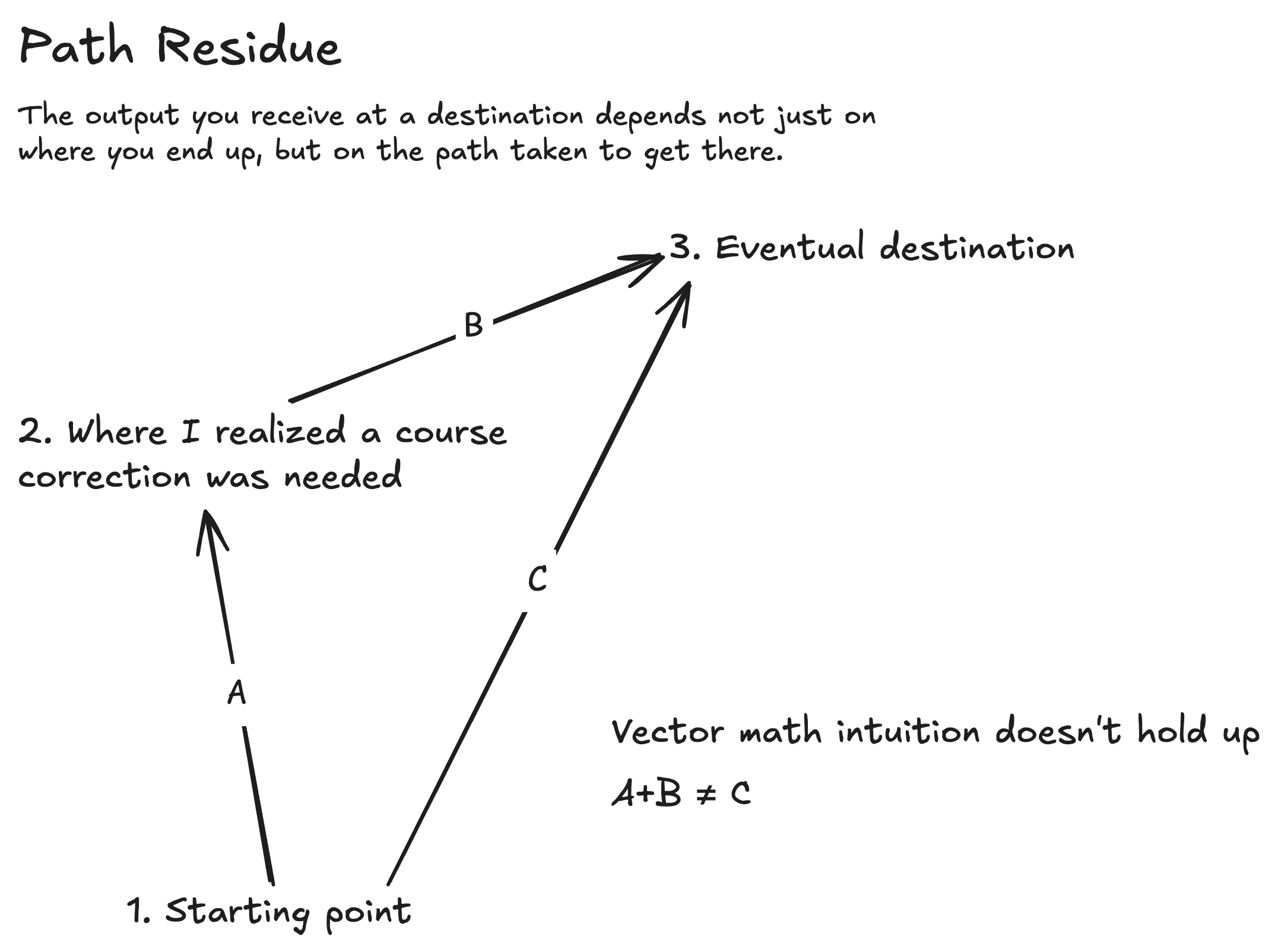
Vector math says A + B should equal C. Both paths reach point 3, the same working install commands. But the path through point 2 leaves the –prefix explanation behind; the direct path never would. Same destination, different residue.
Isn’t this just a context problem?
You might think the fix is to start a fresh AI session: clear the contaminated context and the sediment goes with it. But the sediment doesn’t only live in the model’s context window. It also gets written to files: the comment is in the source, the defensive note is in the README, and the dead scaffolding is committed. Restarting the session leaves every one of those artifacts exactly where it was.
That’s what makes path residue trickier to deal with than ordinary context drift. It outlives the conversation that produced it. Six months later someone reads that –prefix comment, assumes it’s load-bearing, and preserves it through a refactor. The detour has become unnecessary tribal knowledge.
Cleaning it up
The good news: an AI can reason about what’s extraneous. It just doesn’t do it on its own, because from inside the path, each step was necessary, at the time.
So, you must ask for the cleanup explicitly.
- Prompt a residue audit
Review the recent changes and remove anything that’s only there because of the winding path we took to get here, rather than being genuinely needed for the final result. - Separate exploration from production
Do the messy figuring-out in one pass, then regenerate the deliverable in a clean one. - Read diffs with sediment in mind
The tell is a comment that explains a problem you no longer have: a note defending a choice against an alternative that never made it into the final code. If the reader would have to reconstruct your detour to understand why the comment is there, it’s a ghost and can be deleted.
The countermeasure is straightforward: explicitly ask the AI agent to clean up anything that’s only there because of how you got here. The model can tell the difference. It just needs to be told to look.

The idea of “AI Path Residue” is a useful way to explain why the same request can produce different results depending on the conversation and prior instructions. I’d be interested to see how you distinguish helpful context from accumulated residue that quietly steers the output.
Diego, you’ve hit the nail on the head there. Is something an unnecessary residue or a useful record of why a decision was made a certain way – useful so that future reasoning doesn’t make the same mistake. That can only be answered in the future, so how can we decide it now? Removing perceived residue certainly carries the risk of removing information that might be useful down the road. But never removing it guarantees that gunk will accumulate over time and clutter our context. So, it’s certainly a judgment call.