
Until now, we have only been able to reference windows in FileMaker Pro by using their names. But in FileMaker 2026, we can retrieve a unique identifier for the current window and use it to reference and manipulate that specific window. This is a minor but welcome change, as it allows us more freedom in how we name windows, ending the longstanding practice of naming windows for the sole purpose of managing them independently.
How it works
A new custom function, Get (WindowUUID), returns a unique id for each window that the user has open. For example:
- If you open a window called “Edit Client” and invoke this function, you will receive a 36-character alphanumeric string (16-bytes per character) such as “B5CCEA98D81740D4A99A5942D45B03AC”. You can store this UUID in a JSON data object or other data structure for later reference.
- If you then open a second window also called “Edit Client” and invoke the function again, you will receive a distinct UUID, such as “F3736E245EA64A97914533DE8BE1FB34”.
Because FileMaker 2026 now lets you select a window using its UUID (see screenshot), you can select two windows independently even though they have the same name, as in the above example.
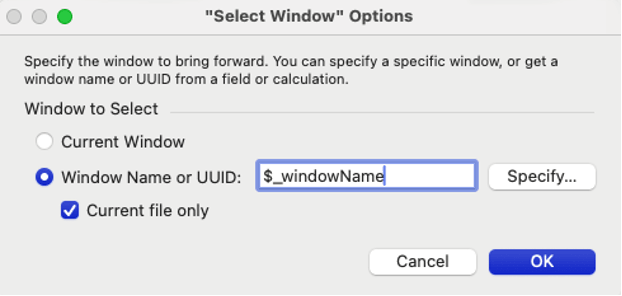
Claris has been thoughtful about backwards compatibility for these script steps. What was previously the “Window Name” option is now “Window Name or UUID”. Whatever calculated value you specify for this option is tested as follows:
- First it is tested against the names of all open windows. If a match is found, the first matching window is selected/closed.
- If a match is not found, it is tested against the UUIDs of all open windows. If a match is found, that window is selected/closed.
- If a match is still not found, the step throws an error.
The Close Window, Move/Resize Window, and Set Window Title script steps work similarly. However, there is no WindowUUIDs function similar to the existing WindowNames function
Use cases and examples
Any technique that refers to windows by name will be made more robust by using Get (WindowUUID) instead as the potential ambiguity introduced by duplicate window names is eliminated. One use case for this is browser-like navigation, where you maintain a stack of the layouts the user has visited, and allow the user to move backwards and forwards within that stack. If you want to maintain separate stacks for each open window, previously those would have been identified by window name, but now can be identified by window UUID.
Download an example of browser-like navigation that uses Paul Jansen’s BrowseNav feature while making use of the Get (WindowUUID) function. His technique is driven by a custom function associated with a hide condition applied to a layout object.
Download the Example
I also recommend reviewing Honza Koudelka’s Back button in 5 minutes post. His technique is based on a script that is triggered when a user leaves a layout or mode. As with BrowseNav, it’s easy to substitute Get (WindowUUID) for Get (WindowName) to distinguish between windows of the same name. I’ve done that with my own copy of his code, but I can’t share it – and it’s a good exercise to make the substitution yourself.
When using the Perform Script on Server with Callback script step, you will want to keep some things in mind. With callbacks, it’s important to anticipate any user actions that might take place between (1) when the user clicks a button or otherwise initiates a process that takes advantage of a server-side subscript and (2) when the callback script is triggered once the server-side subscript is done. For example, the user might change or close a window during that time. If you capture the current window UUID when the button is clicked, you can pass that information to the server-side script and from there to the callback script, where it can be incorporated into appropriate window management.
For more information, see my future blog post about Callback Considerations which will include a demo file.
Share your thoughts
Were this article and the example file helpful? Please share your comments and insights. If you’d like more recommendations for improving user experience and handling complex subscript interactions, our FileMaker team can help. Contact us to get started.

