
FileMaker Server OData API vs Data API
If you haven’t already started using the FileMaker Server OData API rather than the Data API, you might want to do so. Why? Because the FileMaker Server OData API has been replacing the Data API as the API of choice to interact with FileMaker Server.
Let’s consider a few examples:
- The newer FileMaker connector in Claris Connect uses the OData API instead of the Data API to interact with FileMaker data.
- The Claris MCP Server, starting with FileMaker Server 26, uses the OData API exclusively to interact with FileMaker Server.
- Claris Studio leverages the OData API to add external data sources to FileMaker tables and keep the data updated in both Studio and FileMaker.
Clearly, the OData API is the API that Claris is focusing on.
Enhancements to the OData API in FileMaker Server 26
FileMaker Server 26 includes several enhancements to the OData API. Many of those enhancements apply to the metadata API endpoint. The metadata endpoint is not an endpoint that would be used by most FileMaker developers. Rather, the information returned by this endpoint facilitates the integration of FileMaker with other systems, as we’ll discuss in more detail in the next section.
There are also various new features that apply to OData webhooks, and now FileMaker scripts can be called via the OData API by using a script ID instead of the script name. Next, we’ll cover all these changes in turn.
Metadata endpoint
The URL syntax for the metadata endpoint is this:
https://host/fmi/odata/version/database-name/$metadata
And its response is an XML representation of some aspects of the schema of the queried database.
The metadata endpoint is used primarily as a developer and integration aid – a way to discover the schema of a FileMaker database so that external tools can connect to it. Those tools may be Claris Studio, Claris Connect, or Claris MPC, or data analytics tools like Microsoft Power BI, just to provide one example.
One potential use case for any FileMaker developer to leverage the OData API metadata endpoint, could be to dynamically generate a data dictionary of the tables in a FileMaker app. The json response from the OData metadata endpoint would need to be parsed to extract and format the desired information to build the data dictionary. You could do so in a deterministic manner using FileMaker native tools, or you could leverage AI to parse and format the data for you.
Field options
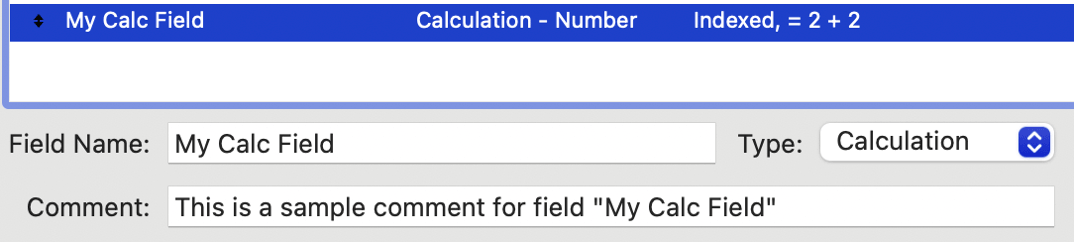
Calls to the metadata endpoint in FileMaker Server 22 already returned field comments. In FileMaker Server 26, the OData API metadata endpoint returns field options, too. Below is an example of the information returned for a FileMaker field called “My Calc Field” (see screenshot for field definition and comment):
<Property Name="My Calc Field" Type="Edm.Decimal"
<Annotation Term="com.filemaker.odata.FieldID" String="FMFID:60130607233" />
<Annotation Term="Org.OData.Core.V1.Computed" Bool="true" />
<Annotation Term="com.filemaker.odata.Index" Bool="true" />
<Annotation Term="com.filemaker.odata.Calculation" Bool="true" />
<Annotation Term="Org.OData.Core.V1.Permissions">
<EnumMember>Org.OData.Core.V1.Permission/Read</EnumMember>
</Annotation>
<Annotation Term="com.filemaker.odata.FMComment" String="This is a sample comment for field "My Calc Field"" />
<Annotation Term="com.filemaker.odata.AIAnnotation" String="This is the annotation for the My Calc Field" />
</Property>Edm stands for Entity Data Model. It is the namespace prefix used to denote OData’s built-in primitive data types.
Note that as of FileMaker Server 22.0.4, field IDs can be used to reference fields, in addition to referencing them by name. This eliminates any issues that can arise in some MCP clients, for instance, that may not support non-ASCII characters that may exist in FileMaker field names.
Also of note: the annotation “com.filemaker.odata.AIAnnotation” in the XML captures the annotation specified in the new “Advanced” option for fields in FileMaker Pro 26. In FileMaker 22.0, the “[LLM]” tag is used in field comments to provide annotation context for AI models. Starting with FileMaker 26, the field annotation to be consumed by AI models can be specified separately from the FileMaker field comment, per se (see screenshot).
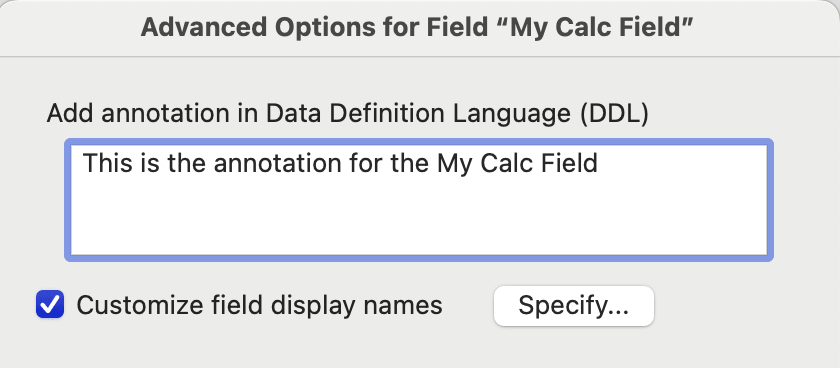
By the way, as suggested in the screenshot above, FileMaker 26 allows us to specify custom field names in contexts such as the Sort Records dialog, the Specify Field Order for Export dialog, etc. Since that new feature falls outside the scope of this blog post, I’ll just refer you to the Claris Defining advanced field options documentation if you are interested in learning more about it.
Scripts
The metadata endpoint in FileMaker Server 26 also returns basic information about the scripts that the account used to make the API call has access to. Here is a sample of the information returned for a script called “OData Test”:
<Action Name="Script.OData Test">
  <Parameter Name="scriptParameterValue" Type="Edm.String" />
  <ReturnType Type="Edm.String" />
  <Annotation Term="com.filemaker.odata.ScriptID" String="FMSID:72" />
</Action>
Note the script ID, which we can use to call FileMaker scripts, as we’ll discuss in the next section.
Calling Scripts by Script ID
For years, we’ve had the ability to execute FileMaker scripts via the OData API “Run script” endpoint. The URL syntax for that API endpoint is this:
https://host/fmi/odata/version/database-name/Script.script-name
The OData API in FileMaker Server 26 allows us to also call scripts by their internal script ID. The URL syntax for that is this:
https://host/fmi/odata/version/database-name/Script.FMSID:script-id
where FMSID is a hard-coded string, and script-id is the internal script ID. Script IDs are integers. If you create a blank FileMaker file, the first script that is created in the file will have a script ID of 1. Script IDs are incremented sequentially.
Calling scripts by name can be brittle, since the call will break if the script is renamed in FileMaker, and the script name is not updated accordingly in existing OData API calls. For this reason, I developed a habit of adding the suffix “_DO_NOT_RENAME” to scripts that are called via FileMaker Server’s APIs. Executing scripts by their internal ID can guard against a script being renamed, and as a result, breaking external calls.
As discussed in the Metadata section of this blog post, scripts are now returned in the metadata response. That response includes the script name and the corresponding FMSID. That is one way you can obtain a script ID, if you want to execute scripts by ID instead of by name.
The arguable disadvantages of using ID instead of name are that we first need to obtain the script ID by making an API call (or using a plugin), and that it’s not immediately obvious when looking at an HTTP call, what’s being called, i.e., a script ID is not meaningful, like a descriptive script name is.
Moving forward, whether we call scripts by ID or by name, I think is largely a matter of preference, or a matter of what advantage or disadvantage of either method we care most about in any one project. Note that everything else – such as how we pass parameters, and what the Run Script OData endpoint returns – remains the same, regardless of whether we reference the script by name or by ID.
OData webhooks
Starting in FileMaker Server 22.0.4, we can register webhooks via the OData API. Webhooks are activated by specific events, primarily record changes (create, update, delete) and table schema modifications. When a webhook is triggered, FileMaker Server sends an HTTP request to the specified URL to notify the webhook receiver of the record or schema change.
OData webhooks open a powerful new set of possibilities for integrating with other systems. If we think of FileMaker script triggers more generically as event handlers, OData webhooks are the first table-level event handler we have in FileMaker. There are window-based triggers, like OnFirstWindowOpen and OnLastWindowClose. There are layout-based triggers like OnRecord Load. And there are layout object-based triggers, like OnObjectEnter. With OData webhooks, we can now get a notification when a change takes place at the table level.
Here are some potential use cases for OData webhooks:
- Real-time synchronization: keeping data consistent across different systems, without the need to manually implement in a FileMaker application pushing those changes to other systems
- Automation workflows: Triggering actions in third-party services when a key event happens in FileMaker
- Notifications: Sending alerts via messaging platforms, email, etc., upon specific data changes
- Auditing and Compliance: Capturing detailed logs of changes for accountability
OData webhooks offer a lot of potential, which at Soliant Consulting we have been testing and leveraging in our solutions. To learn more about OData webhooks, the Claris documentation is a good starting point, or you can contact us for assistance.
Webhook Changes in FileMaker Server 26
- Added support for maxFailedAttempts in the request body when subscribing to a webhook
- Added logging of webhook notification errors to the fmodata.log
- When all records are deleted from a table that has a webhook subscribed to it, or when the table is truncated, the webhook notification will now return a ROWID of -1
Miscellaneous
There are other OData-related changes in FileMaker Server 26, namely:
Auto-start OData After a Crash
If the Web Publishing engine (fmscwpc), Data API engine (fmwipd), or OData engine (fmodata) terminates unexpectedly, FileMaker Server will now automatically attempt to restart them.
OData Becomes Unresponsive When odata.log Rolls Over
Fixed an issue causing OData to become unresponsive when fmodata.log rolls over.
Other Bug Fixes
FileMaker Server 26 addresses other bugs in the OData API. For a complete list of those, I refer you to the FileMaker Server Release Notes.
Navigating FileMaker 2026
If you’d like more insights on how new features and changes in FileMaker 2026 can benefit your FileMaker application, our team can help. Contact us to get started.

