
If you want to create a new Lead via Visualforce or web form with Apex it’s very possible you could overlook the Assignment Rules. As you might know, it’s not even always obvious on the native Lead creation layout. Notice the lower left corner checkbox in the screenshot below.
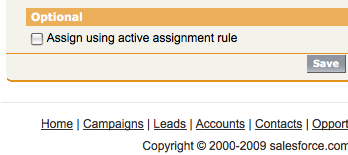
To enforce Assignment Rules in Apex you’ll need to instantiate the Database.DMLOptions class, set the useDefaultRule property of assignmentRuleHeader to True, and finally call a native method on your Lead called setOptions, with the Database.DMLOptions instance as the argument. The code below demonstrates:
// to turn the Assignment Rules on
Database.DMLOptions dmo = new Database.DMLOptions();
dmo.assignmentRuleHeader.useDefaultRule = true;
theLead.setOptions(dmo);
Next Steps
Have questions? Let us know in a comment below, or contact our team directly. You can also check out our other posts on Apex.


Great post! It solve my problem. Thanks!
Can someone one send me a samlpe Apex trigger?I tried all the operations and keep getting error when triggered. Some of the errors are below:System.SObjectException: DML statment cannot operate on trigger.new or trigger.old: Trigger.myTrigger: System.FinalException: Record is read-only: Trigger.myTrigger: